This playbook is for the owner who already knows how to reduce food delivery app commission in theory and wants a plan that survives a Friday rush. It is written for restaurants, cloud kitchens and cafes in India that take most of their orders through the delivery apps and want to move a real share of those orders, about 30 percent, onto a channel they own within 90 days. By the end you will have your true cost per app order written down, a working WhatsApp ordering channel with UPI payments, a packaging insert and a weekly campaign that stay inside the platforms' rules, and a scorecard that tells you every Sunday whether the plan is on track. The one belief it will change is that you have to choose between the apps and your own channel. You do not. The apps are good at finding strangers and expensive at serving regulars, so the plan keeps them for the first order and takes the repeat order home. Every chapter ends with a checklist. Every rupee figure is illustrative, built from typical numbers rather than any named merchant, and you should replace it with your own.
Chapter 1: What an app order really costs you
Commission on the big delivery apps in India is commonly 18 to 30 percent of order value. That is the number in your contract, and it is the smallest of the numbers that matter. By the time an order reaches your bank account it has also paid GST on the commission, a payment processing charge, your share of any discount shown to the customer, and whatever ad budget you switched on. Owners who track only the headline rate are usually surprised by the effective one.
The five lines in every payout
- Commission. A negotiated percentage of the order value, set through your account manager. Check whether it applies to food alone or food plus packaging.
- GST on the commission. The platform's commission is a service, so it carries GST, deducted from your payout. On a 25 percent commission this adds a few more percent of order value.
- Payment processing. A small percentage on online-paid orders, usually applied to the full order value including delivery and packaging.
- Funded discounts. Flat-off offers, buy-one-get-one and loyalty programme benefits are often paid for by the restaurant in part or in full. Several are switched on by default when a listing goes live.
- Ads, refunds and penalties. Promoted placement, refunds charged back after complaints, and penalties for rejected orders. These vary month to month, which is why they hide.
The full line-by-line explanation, including who collects the GST on the food itself, is in what a food delivery app really costs a restaurant. Read it once with your latest settlement statement open.
A worked example: one ₹400 order on each channel
The table below is illustrative. It assumes a 25 percent commission, 18 percent GST on that commission, a 2 percent processing charge, and a ₹40 restaurant-funded discount on the app side. On the direct side it assumes a flat ₹10 per-order platform fee, which is what Tezzu charges, a 2 percent payment gateway charge on an online payment, and ₹40 for your own rider or a hyperlocal courier on a short trip. The app's rider is included in the app's charges, so delivery is counted on both sides.
| Line | App order | Direct order on WhatsApp |
|---|---|---|
| Order value | ₹400 | ₹400 |
| Commission at 25 percent | ₹100 | ₹0 |
| GST on commission at 18 percent | ₹18 | ₹0 |
| Payment processing or gateway charge | ₹8 | ₹8 |
| Funded discount | ₹40 | ₹0 |
| Platform fee | ₹0 | ₹10 |
| Delivery | Done by the app | ₹40, your rider |
| Kept before food cost | ₹234 | ₹342 |
| Effective cost of the channel | 41.5 percent | 14.5 percent |
Remove the funded discount and the app order leaves you ₹274, an effective cost of 31.5 percent, which is still roughly ₹70 an order worse than direct after paying your own rider. Charge the direct customer a ₹20 delivery fee and the gap widens again. This ₹70 to ₹110 per order is the budget for everything else in this playbook: the insert, the coupon, the free-delivery threshold and the campaign wallet all come out of it, with plenty left over.
Scale it to a month
Take a restaurant doing 1,500 orders a month at ₹400 average, ₹6 lakh in sales, with 95 percent of orders on the apps. At an effective cost of 31.5 percent without discounts, the apps take about ₹1.8 lakh a month. If 450 of those orders, 30 percent, move direct at ₹58 each in platform fee, gateway charge and rider cost, the channel cost on those orders falls from about ₹56,700 to about ₹26,100. That is roughly ₹30,000 a month more margin on the same sales, before the plan subscription and campaign spend of perhaps ₹3,000, and before counting the discounts you no longer fund. The commission calculator post lets you run the same arithmetic with your own figures.
Checklist: know your number before day one
- Pull the last three monthly settlement statements from each app.
- Add up commission, GST on commission, processing charges and funded discounts for each month.
- Divide by gross order value to get your effective rate. Write it down with the date.
- List ads, refunds and penalties separately so you can see what you control month to month.
- Note which promotions are live and which were switched on by default.
- Count your orders per month and your average order value; you will need both for the scorecard.
Chapter 2: The 30/70 split and your starting line
The 30/70 rule says that a settled restaurant should aim for roughly 30 percent of orders from the apps and 70 percent direct, reached over months rather than overnight. The apps do discovery, which is worth paying for once per customer. The repeat order is where commission hurts most, because the app contributes nothing to it except a rider. The reasoning and the five-step method are in the 30/70 rule; this playbook is the execution.
The target for the next 90 days is narrower than the full rule. You are going to move 30 percent of your total orders onto your own channel. If you start at 95 percent apps, you finish around 65 percent apps and 35 percent direct. If you start at 80/20, you finish near 50/50. Either way, the apps keep running and keep bringing new faces.
Measure your baseline for one week
You cannot see which app customers are regulars from the app, but after a few months in business you recognise names and addresses on the slips. For seven days, keep a simple log of every order by channel: app one, app two, phone, walk-in, WhatsApp, store page. For each app order, mark it "recognised" or "new". At the end of the week you have two figures: your current app share, and the share of app orders that come from people who already know you.
That second figure is your immediate opportunity. If 40 percent of your app orders are from recognised names, those are the customers who will move first, because the hard part, liking your food, is already done.
What the starting line means for the plan
| Your starting mix (apps/direct) | Likely regular share inside app orders | Day-90 target (apps/direct) | What to expect |
|---|---|---|---|
| 95/5, new kitchen under a year old | Low, 15 to 25 percent | 70/30 | Growth comes from inserts in every app order; the list builds slowly at first |
| 85/15, two to three years old | Medium, 30 to 45 percent | 55/45 | Regulars move fast once there is a reason; the second-order rate decides the result |
| 70/30, established neighbourhood restaurant | High, 45 percent or more | 40/60 | Mostly a matter of making the direct channel easier than the app |
These bands are illustrative. The pattern holds regardless: the more regulars you have, the faster the ratio moves, and the less you depend on finding new customers to hit the target.
Checklist: baseline week
- Log every order by channel for seven consecutive days, including a weekend.
- Mark each app order as recognised or new.
- Record your app share and your recognised share with the date.
- Set your day-90 direct-share target in writing: your current direct share plus 30 points.
- Decide who owns the Sunday review. One person, every week, for 13 weeks.
Chapter 3: Week one: set up WhatsApp ordering and payments
Customers will not switch to something harder than the app. The app remembers their address, takes UPI and tells them where the rider is. "Call us to order" loses to that every time. Before you print a single card, the direct channel has to do at least this much: show a menu the customer can tap through, remember their address, take UPI and cards with cash on delivery as a fallback, confirm the order and send status updates automatically, and show delivery charges before they confirm.
A WhatsApp ordering platform on your own number does all of that. The WhatsApp Business app on its own does the catalog and little else, and the number stays stuck to one phone. The rest of this chapter assumes a platform; the steps map onto Tezzu, where setup takes about 30 minutes of actual work spread over a week because payment activation runs in the background.
The seven-day setup
| Day | What you do | Time | Done when |
|---|---|---|---|
| Day 1 | Create the account, connect your WhatsApp number through Meta's embedded signup, choose your store name, apply for Razorpay activation with PAN, bank details, business proof and GST certificate. Order 1,000 insert cards from the printer. | 40 minutes | Bot replies to "hi" from your phone; Razorpay application submitted |
| Day 2 | Build the menu: categories, your 15 to 20 best sellers, variants (half and full), add-ons, photos for the top ten. Set opening hours. | 60 to 90 minutes | A friend can find and add your best seller without asking a question |
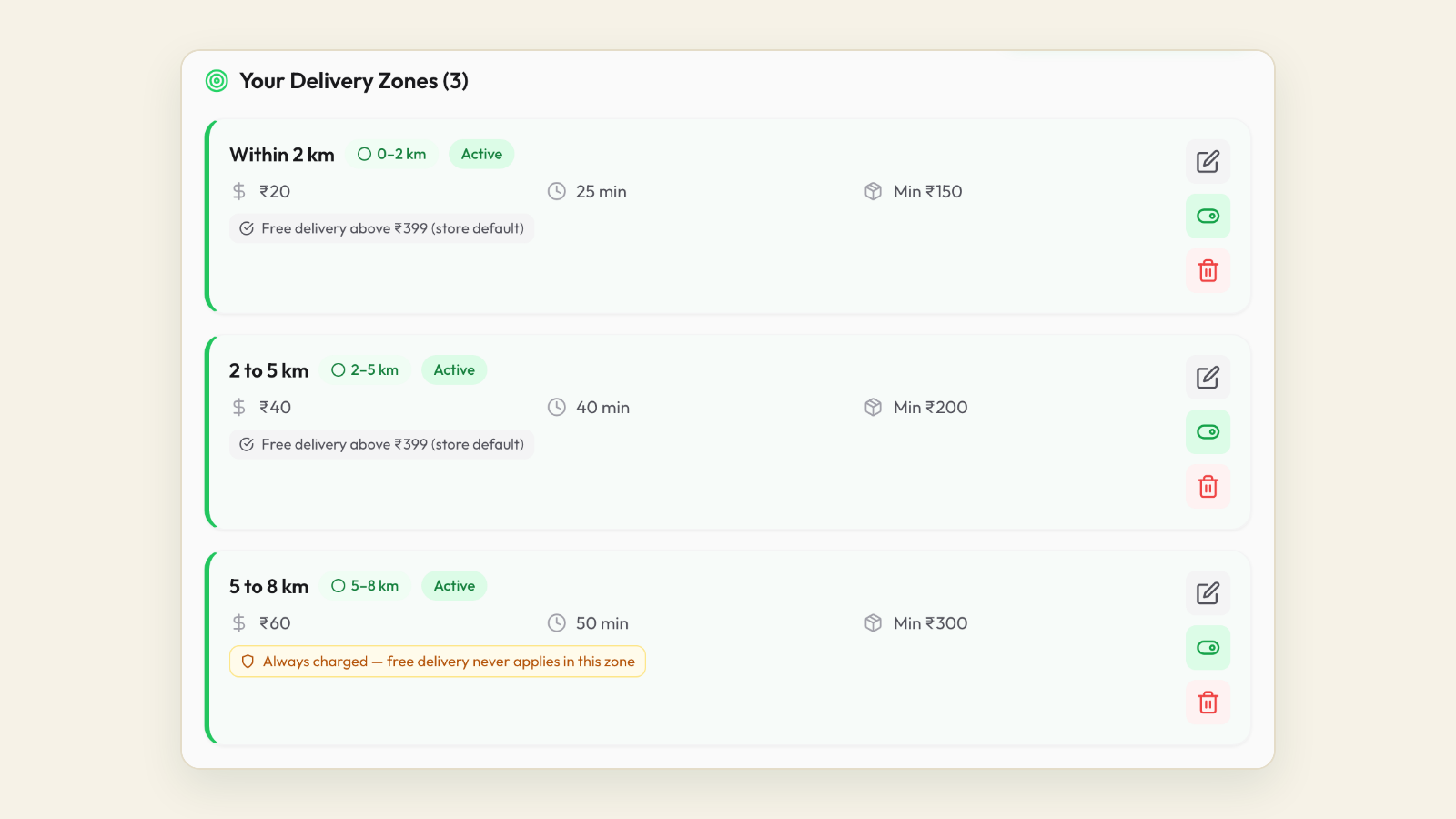
| Day 3 | Set delivery zones by distance with a charge per zone and a free-delivery threshold in the inner zone. Add a self-pickup point if customers collect. Turn on cash on delivery. | 20 minutes | A test order 4 km away shows the right charge before checkout |
| Day 4 | Create staff logins with roles, install the staff app on the kitchen phone with new-order alerts, connect the thermal printer, enter GST details for bills. | 30 minutes | A test order rings in the kitchen and prints a KOT |
| Day 5 | Ask five regulars you know personally to order on the number. Watch each order in the dashboard. Fix whatever confused them. | Through the day | Five real orders delivered, each confirmed and updated on WhatsApp |
| Day 6 | Create the first-direct-order coupon and set it to auto-apply. Put a promo banner on the store page with the offer. Write the opt-in question for after checkout. | 20 minutes | A new number placing a first order sees the discount without typing a code |
| Day 7 | Put the store link on your Google Business Profile as the order link and on your Instagram bio. Check online payments are live; if Razorpay activation is still pending, keep cash on delivery as the default and switch when it clears. | 20 minutes | The order button on Google opens your menu on a phone |
The step-by-step screens for day one are in setting up WhatsApp ordering with Tezzu in 15 minutes, and the payment activation documents are listed in the Razorpay setup guide.
Three settings that decide whether customers come back
The number. Keep your own number. Customers who already have it saved will find the ordering bot without being told. If the number is currently on the WhatsApp Business app, the app account has to be deleted first because Meta allows a number on either the app or the API, so plan that for a quiet morning. Many owners put a fresh SIM on the ordering system and forward the old number's callers to it for a month.
Zones and charges. Far deliveries lose money on small orders. Two or three zones, a higher charge and a minimum order for the outer ring, and a free-delivery threshold set a little above your average order value in the inner ring is the standard shape. A customer who sees "free delivery above ₹349" adds a side. The arithmetic is in delivery zones and free-delivery thresholds in Tezzu.
Alerts. A direct order that sits unseen for twenty minutes sends the customer back to the app for good. The staff app should ring on the kitchen phone, with a new-order alert switched on if the kitchen is noisy, and someone on every shift should own the dashboard.
Checklist: do not announce the channel until
- The bot opens with the menu, with no greeting that needs a reply first.
- Five real orders from regulars have gone through end to end.
- Online payment confirms itself, or cash on delivery is clearly the only option shown.
- The delivery charge appears before the customer confirms.
- Order confirmation, preparing, out-for-delivery and delivered messages all arrive on the customer's phone.
- New-order alerts reach a named person on each shift.
- The auto-apply coupon works for a brand-new number.
Chapter 4: Converting app customers within the rules
You convert app customers on surfaces you own: the bag, the box lid, the bill, your Google listing and your Instagram. The customer finds your channel there, chooses to try it, and from their second direct order the commission is gone. The method works without touching the platform's data, which is what keeps it inside your partner agreement and inside India's consent rules.
The three boundaries
- You never get customer numbers from the app. They are masked, and the partner terms cover how platform data may be used. Do not try to save them from order slips, and never message anyone using a number you only have because of an app order.
- Your packaging and your listings are yours. Printing your brand, your number and your ordering link on your own box is ordinary branding. Keep the insert about your restaurant, never about the platform, and check your agreement for any specific wording on inserts.
- Consent before marketing. A customer who orders on your number has opened a conversation, which allows replies and order updates. Weekly offers need a clear yes, collected in the same chat after the first order.
Inside those lines, everything below is simply good marketing. The detail on what platforms have actually objected to is in converting delivery app customers into direct customers within the rules.
The insert: the main conversion tool
A business-card-sized print that goes into every outgoing packet, app orders included, dine-in bills included, pickup bags included. It carries four things and nothing else.
- Your name and one warm line. "Thank you for ordering. We cooked this one for you."
- A QR code that opens a chat with your WhatsApp number with a pre-filled message such as "Hi, I would like to see the menu."
- The reason to switch, in one line. "Order direct on WhatsApp: free delivery above ₹349 and 10 percent off your first order."
- Your store link in text, for people who prefer to type.
Cards cost a rupee or two each in a run of a thousand. Add a sticker on the box lid with the number and the offer, because cards go out with the bag and lids are seen while eating. Put the same QR on a standee at the counter and on every printed bill; dine-in guests are your best future delivery customers because they already like the food.
Pick an incentive that costs less than the commission
Every direct order saves you roughly ₹100 to ₹120 on a ₹400 order once GST on commission is counted. The incentive only has to cost less than that. The figures below are illustrative for a ₹400 order and a short delivery trip.
| Incentive | Cost to you per direct order | Commission and GST saved | Net gain | Best used for |
|---|---|---|---|---|
| Free delivery above ₹349 | About ₹40 (rider) | ₹118 | About ₹78 | Every order; nudges basket size up |
| 10 percent off the first direct order | ₹40 once, then ₹0 | ₹118 | ₹78 on the first order, ₹118 after | Getting the first order from an app customer |
| Direct menu priced 10 percent below the app menu | ₹40 every order, but you were already paying it as commission | ₹118 | About ₹78 | Customers who compare prices; no coupon needed |
| Free dessert on every fifth direct order | About ₹60 spread over five orders | ₹590 over five orders | About ₹530 over five orders | The second to fifth order, where the ratio really moves |
| 10 percent off every direct order forever | ₹40 every order | ₹118 | ₹78, but the discount never stops | Avoid; a one-time coupon plus a threshold does the same job |
Choose one offer for the first order and one for the repeat, and keep both unchanged for the full 90 days so the message has time to land. Changing the offer every fortnight teaches customers to wait for a better one.
Checklist: before the first card goes into a bag
- Partner agreement read for the clause on inserts and solicitation.
- Card carries your brand, QR, offer and link, with no mention of any platform.
- QR tested from three different phones; it opens the right number with the pre-filled message.
- The first-order coupon on the card auto-applies at checkout.
- The free-delivery threshold on the card matches the one set in your zones.
- Sticker ordered for box lids; standee printed for the counter.
- Staff told that every packet, every bill and every pickup bag gets a card, with no exceptions.
Chapter 5: Order-direct campaigns on surfaces you own
An order-direct campaign is a steady drumbeat rather than a one-off blast. Customers only see it when they order, and most regulars order a few times a month, so the same message has to appear in the same places for months. It is also a trade rather than a complaint. "Order direct and get free delivery" works because it names the customer's benefit. "The apps charge us too much" does not, because the customer does not care.
Seven placements, each with its own code
Give every placement its own coupon code or its own link so you can see which one brings first orders. The codes below are examples.
| Placement | What it says | Tracking | Cost | When the customer sees it |
|---|---|---|---|---|
| Packaging insert | Offer, QR, number, link | Code BAG10 | ₹1 to ₹2 per card | Unpacking an order, including app orders |
| Box lid sticker | Number and offer only | Code LID10 | Under ₹1 per sticker | While eating |
| Dine-in bill and counter standee | QR and "order direct next time" | Code BILL10 | Print once | Paying after a meal |
| Google Business Profile | Order link, menu link, WhatsApp chat option | Separate link or code GMAP10 | Free | Searching your name or "near me" after an app order |
| Instagram bio and reel captions | Store link first, WhatsApp second, one line in every caption | Code INSTA10 | Free | After watching a reel |
| WhatsApp Status | Today's special with the order link, two or three times a week | Count orders in the hour after posting | Free | Anyone who has saved your number |
| Weekly broadcast to opted-in customers | One offer, one link, an opt-out line | Auto-apply coupon per campaign | Per-message charge from a prepaid wallet | Thursday or Friday afternoon, before the weekend decision |
The first three placements reach exactly the people already paying you, which is why they produce most first direct orders. The Google and Instagram placements catch people who search your name after an app order. The last two drive the second order, which is the subject of the next chapter. More placement wording and card examples are in order direct campaigns.
Copy you can print this week
Insert card:
Thank you for ordering from [Restaurant]. Next time, order direct on WhatsApp: free delivery above ₹349 and 10 percent off your first direct order. Scan the code or message 98XXX XXXXX. Same menu, no app needed.
Box lid sticker:
Order direct: WhatsApp 98XXX XXXXX. Free delivery above ₹349.
Opt-in question, sent in the chat right after the first order is confirmed:
Order confirmed, [Name]. One more thing: would you like weekend offers and new dishes from [Restaurant] on WhatsApp, about once a week? Reply YES to opt in. Reply STOP at any time to leave.
First weekly broadcast:
Hi [Name], this weekend at [Restaurant]: free delivery on direct orders above ₹349, Friday to Sunday. Order on WhatsApp or at [link]. Reply STOP to opt out.
The opt-in question is the single most valuable line in this playbook, because the opted-in list is the asset the apps never give you. The wording rules, and what counts as a valid yes under Meta's policy and India's data protection law, are in WhatsApp opt-in without annoying customers.
What a weekly broadcast costs
Marketing messages sent through the WhatsApp Business API are charged per message at a rate Meta publishes for India and changes from time to time; on Tezzu the charge comes out of a prepaid campaign wallet as messages are delivered, with nothing charged for undelivered ones. At the rates Meta has published, a message costs less than a rupee. A broadcast to 200 opted-in customers therefore costs a few hundred rupees and pays for itself with two or three orders at ₹100 of saved commission each. A broadcast to 1,000 customers needs ten to fifteen orders to break even, which a real weekend offer to people who already like your food will normally clear.
Checklist: campaign hygiene
- One placement, one code, so the Sunday review can rank them.
- One broadcast a week at most, sent between 11 am and 7 pm, never late at night.
- Every broadcast carries a STOP line; every STOP is honoured the same day.
- Only customers who said yes are in the broadcast list. Numbers from app slips, groups or bought lists are never added.
- Claims are true: if the card says prices are lower direct, they are.
- Status posts go up on the days you are quiet, with a photo of a real dish.
Chapter 6: Make the second direct order automatic
Getting one direct order from an app customer is the easy half. The ratio moves on the second, third and tenth. Three things make those happen: the customer's first experience is as smooth as the app, they are reminded at the right moment, and they have a visible reason to come back to your number specifically.
The flow every direct order should follow
- Confirmation in the chat within seconds, with the order number, the items, the total with delivery shown separately, the payment status and a delivery estimate. Say 40 minutes if it is 40 minutes.
- Status updates as the order moves: preparing, out for delivery, delivered. On a platform these go out when staff change the status in the dashboard, which also means staff have to change the status.
- A rating request 30 to 60 minutes after delivery, once the customer has eaten. Ratings of four or five stars go on your store page, where you own them. Anything below three gets a personal reply from the owner within the hour, which turns a complaint into a regular more often than you would expect.
- The opt-in question, if it was not asked at the first order.
Most "where is my order" chats disappear when step one is done properly, and most negative public reviews are caught at step three before they are written.
The reminder and the reason
The weekly broadcast from Chapter 5 is the reminder. The reason is a loyalty reward that only exists on your channel: a free dessert or starter on every fifth direct order costs you about ₹60 spread across orders that would have cost ₹500 or more in commission. No card, no app, no points system; the dashboard knows the customer's order count and a staff member sends the nudge after the fourth order. A simple version is described in a restaurant loyalty program on WhatsApp.
Keep your direct prices equal to or below your app prices, never above. The customer should be able to see why they switched.
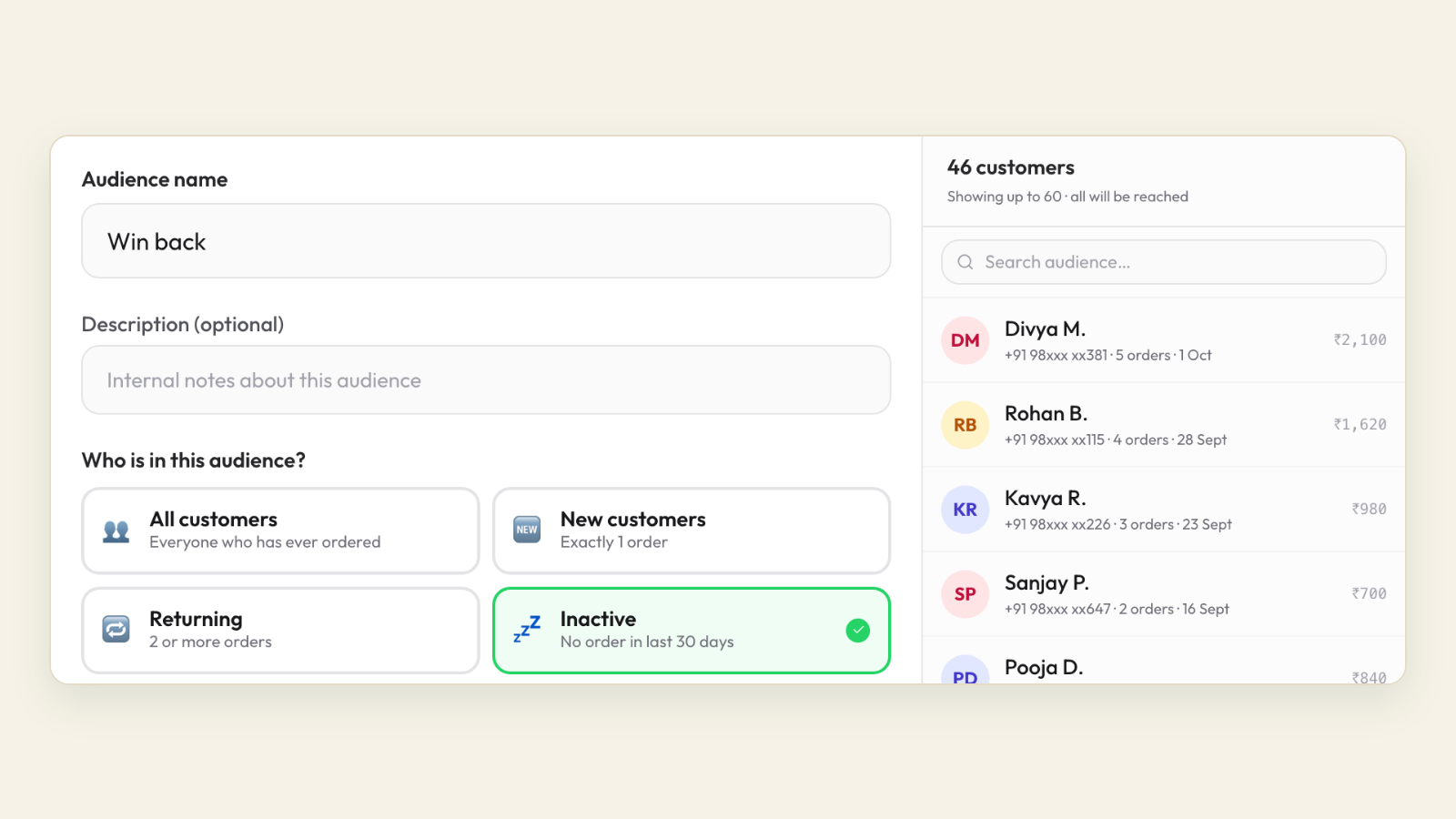
Segment the list once it passes 300 names
| Segment | Definition | Message | Frequency |
|---|---|---|---|
| New | First direct order in the last 30 days, no second order yet | A one-time nudge with the loyalty reward explained | Once, 10 to 14 days after the first order |
| Active | Two or more direct orders, last one within 45 days | Weekend special, new dish, festival pre-order | Weekly |
| Lapsed | No direct order for 45 to 90 days | A win-back message with a small, specific offer | Once, then monthly at most |
| Dormant | No order for more than 90 days | A single re-confirmation asking for a YES, then nothing | Once |
The dashboard's customer insights give you these groups without a spreadsheet, which matters because the person running this is also running a kitchen.
Checklist: the second-order system
- Confirmation, status and delivered messages verified on a customer's phone, not just in the dashboard.
- Rating request timed for after the meal, with a named owner replying to low ratings.
- Loyalty reward chosen, written on the insert, and explained in the new-customer nudge.
- Direct menu prices checked against the app menu; none higher.
- Segments set up and a different message written for each.
- Second-order rate within 30 days added to the scorecard.
Chapter 7: Run the app side deliberately
Once direct orders are flowing, the apps become a marketing expense you manage rather than a channel that manages you. The tactics here are smaller than the direct channel, each worth a few points, and together they are worth doing in the same 90 days. The full list, with the arithmetic, is in how to reduce food delivery app commission: 9 tactics that work.
Trim what you pay on the orders that stay
- Negotiate with your numbers in hand. Rates vary by city, category, volume and listing history, and are set through your account manager. Bring your monthly order count, average order value, rating and rejection rate, and ask for a lower base rate in exchange for consistent prep times and a low rejection rate. Two or three points on ₹3 lakh of app sales is ₹6,000 to ₹9,000 a month.
- Switch off default promotions. Review every live offer. Keep the ones that bring new customers; remove the ones that discount orders you would have received anyway. This is usually the quickest saving on the list.
- Price the app menu to carry the commission. Many restaurants list app prices 10 to 15 percent above direct prices. Check your agreement for price parity clauses first, and keep the gap modest.
- Set packaging charges at real cost. Leaving them at zero moves money from your side into the percentage calculation.
- Move bulk orders to WhatsApp. A ₹4,000 party order on an app costs the same percentage as a ₹200 snack. Put "for party orders, message us directly" in your listing description and on the insert.
- Keep the radius tight. Long-distance app orders earn a bad rating and the same commission. Ask your account manager to narrow the serviceable area if far deliveries are producing complaints.
- Protect the rating. Discovery still depends on it. Fix packaging and prep time before you cut anything else.
When not to delist
Delisting is a separate decision from this playbook and usually a later one. A restaurant with 15 percent direct orders that delists loses 85 percent of its volume overnight. Let the ratio move first. A reasonable rule: do not consider leaving an app until direct orders have held above 50 percent for two consecutive months and the app's net contribution, after commission, discounts and ads, is below what you would spend to replace those customers. The decision framework, with the week-before checklist if you do go ahead, is in should you leave the delivery apps.
Checklist: the app side, once in the 90 days
- Account manager conversation booked with order count, AOV, rating and rejection rate in hand.
- Every live promotion reviewed; default ones switched off unless they bring new customers.
- App menu prices reviewed against the agreement and against your direct prices.
- Packaging charges set to actual cost.
- Listing description updated with the party-order line.
- Radius reviewed against late-delivery complaints by area.
Your 90-day plan
The plan runs in six fortnights. Direct-share targets are illustrative for a restaurant starting at 5 to 15 percent direct; if you start higher, add your starting share to each target. An illustrative version of this timeline, with month-by-month numbers for a single-kitchen biryani brand, is in the cloud kitchen case study.
| Days | Focus | Actions | Direct share target at end |
|---|---|---|---|
| 1 to 7 | Know your number, build the channel | Effective rate from three statements; baseline week log; account, number, menu, zones, payments application, staff app; cards ordered | Baseline |
| 8 to 14 | Quiet test | Five regulars order; fix confusion; coupon auto-applies; Google and Instagram links live; online payments switched on when activation clears | Baseline plus 3 points |
| 15 to 30 | Inserts in every packet | Card and lid sticker in every order including app orders; bill QR and counter standee; opt-in question after every first order; default app promotions switched off | Baseline plus 8 points |
| 31 to 45 | First campaigns | First weekly broadcast to opted-in customers; Status posts three times a week; codes reviewed by placement; account manager conversation | Baseline plus 14 points |
| 46 to 60 | Second-order system | Loyalty reward live; new-customer nudge at day 10 to 14; rating request timing checked; app menu pricing and packaging charges reviewed | Baseline plus 20 points |
| 61 to 75 | Segments and win-back | List split into new, active, lapsed; first win-back message; radius trimmed where far deliveries complain; bulk orders routed to WhatsApp | Baseline plus 25 points |
| 76 to 90 | Review and decide | Full scorecard against day-zero numbers; keep the two best placements, drop the worst; set the next 90-day target; revisit the delisting rule only if direct share is past 50 percent | Baseline plus 30 points |
The scorecard
Fill this in every Sunday. The dashboard gives you most of it; the app statements give you the rest once a month.
| Metric | Where it comes from | Day 30 | Day 60 | Day 90 |
|---|---|---|---|---|
| Direct orders as a share of all orders | Dashboard orders by channel plus app order counts | Baseline plus 8 points | Baseline plus 20 points | Baseline plus 30 points |
| First direct orders by placement code | Coupon usage in the orders list | Insert is the top code | Two codes producing most orders | Weakest placement dropped |
| Second direct order within 30 days | Customer insights, repeat customers | Measured | 1 in 3 or better | 1 in 2 or better |
| Opted-in customers | Campaign audience count | Growing from every first order | Broadcast list past 300 | Segments in use |
| Orders in the 24 hours after a broadcast | Orders list filtered by the campaign coupon | Not yet | Covers wallet cost with margin to spare | Best send time known |
| Effective app cost | Monthly settlement statements | Promotions off | Rate or add-ons renegotiated | Down by a few points |
| Direct average order value | Dashboard revenue divided by direct orders | Measured | At or above the app AOV, lifted by the threshold | Stable |
| Rating on the apps and on your store page | App dashboards; your own reviews | Held | Held | Store page rating visible to new customers |
The Sunday review in ten minutes
- Update the eight metrics above.
- If direct share is behind target, check the insert first: is a card going into every bag, and does the QR still work?
- If first orders are fine and second orders are not, the repeat reason is too weak; strengthen the loyalty reward before printing more cards.
- If a broadcast produced fewer orders than its wallet cost, change the send time and the offer before changing the list.
- If app ratings slipped, pause growth work and fix prep time and packaging that week.
- Write down one thing to change next week. Only one.
Frequently asked questions
How do I reduce food delivery app commission without leaving the apps?
Work on two layers. On the app side, negotiate the rate with your order history in hand, switch off promotions you fund that only discount regulars, price the app menu to carry the commission where your agreement allows, and set packaging charges at cost. On your own side, build a WhatsApp ordering channel that is as easy as the app and move repeat orders there with a packaging insert and a weekly campaign. The second layer is where most of the saving lives, because commission on a direct order is zero.
Is moving 30 percent of orders off the delivery apps in 90 days realistic?
For a restaurant with an established base of regulars, yes, and some get further. A kitchen under a year old with few repeat customers will move more slowly, because the insert has to reach the same person several times before a habit forms. The direct channel has to work smoothly before you promote it, and a card has to go into every single packet. Restaurants that miss the target usually skipped one of those two things rather than the campaign.
What does it cost to run the direct channel instead of paying commission?
On Tezzu, a plan from ₹999 to ₹3,999 a month with unlimited orders, a flat ₹10 per order with no commission, a payment gateway charge on online payments, campaign messages from a prepaid wallet at Meta's published per-message rate, and your own delivery cost per order if you deliver. On a ₹400 order, the platform fee is 2.5 percent against an effective app cost that is commonly 30 percent or more once GST on commission and funded discounts are counted. Every plan starts with a 7-day free trial.
Can I put my WhatsApp number on the packaging of a delivery app order?
Your packaging is yours and most restaurants print their own branding and contact details on it, which is what the insert is. Keep it about your restaurant and your offer, without naming or criticising any platform, and read your current partner agreement for its wording on inserts and solicitation. What you must not do is contact customers using details the platform shared for delivery, or solicit inside the app's own chat.
What offer works best to get app customers to order direct?
Free delivery above a threshold set a little above your average order value, combined with a one-time coupon on the first direct order, works for most restaurants and costs far less than the commission it replaces. For the second order onwards, a small loyalty reward every few orders does more than a discount, because it gives the customer a reason to come back to your number specifically. Keep the offer unchanged for at least three months so it has time to land.