POS alternatives for small restaurants in the USA come up for a short list of reasons: the monthly cost of a big all-in-one system adds up once you count the software plan, the hardware and the add-ons; payment processing is locked to the POS vendor at the vendor's rates; the contract runs longer than the lease on the fryer; and the online ordering module ends up costing nearly as much as the delivery app commission it was supposed to replace. The leading all-in-one restaurant POS systems are capable, and for a busy full-service restaurant that wants one vendor for everything they often fit. For a 30-seat place, a taqueria, a cafe or a family-run Indian restaurant, they can be more system than the business needs.
This comparison looks at the main categories of alternative, what each is actually for, how each charges, and who it suits. It also separates the three jobs an all-in-one POS bundles together, because the right alternative depends on which of those jobs you are trying to replace.
Why small restaurants look for a cheaper restaurant POS
- Cost at low volume. All-in-one vendors price their software in tiers, often with a starter option that has no monthly software fee in exchange for higher processing rates, and paid plans above it. Add handhelds, a kitchen display, online ordering and delivery modules, and the bill grows. Figures change often; check the vendor's pricing page before you compare.
- Processing is not optional. Most all-in-one systems require you to process cards through them. The rate is negotiated at signing and is part of how the system is paid for, which means a cheaper software plan can come with a higher processing rate.
- Contract length. Agreements have commonly run for multiple years with early termination terms. Read yours before planning a switch.
- Hardware. Many all-in-one systems run only on their own terminals. If you leave, the hardware does not come with you to another POS.
- Online ordering cost. Online ordering and delivery add-ons are priced as modules, and third-party delivery through the vendor's courier network carries per-order charges. Many small restaurants find they are paying the POS vendor for the counter and still paying a delivery app for most online orders.
First decide what you are replacing
An all-in-one POS does three jobs. Most small restaurants are unhappy with one of them, not all three.
- The counter POS: taking in-person orders, splitting checks, printing kitchen tickets, closing the day.
- Payments: processing cards in person and online, and settling to your bank.
- Online ordering: a menu customers order from on their phone, with delivery or pickup, and the marketing that goes with it.
If the counter POS works and the complaint is the cost of online orders, you do not need a new POS. You need a direct ordering channel that costs a flat fee per order and connects to your existing kitchen printer. If the complaint is processing rates, the alternatives that let you choose your processor matter most. If the whole stack feels too heavy, a simpler POS plus a separate ordering channel is usually cheaper than any all-in-one. The question of whether a small place needs a POS at all for table orders is worked through in table ordering system: do you need a POS or just WhatsApp.
Restaurant POS competitors and alternatives compared
Pricing models are described rather than quoted, since each vendor changes rates and negotiates processing. Check their current pricing pages.
| Category | What it is | Pricing model | Who it suits |
|---|---|---|---|
| All-in-one restaurant POS | Restaurant POS with proprietary hardware, online ordering, delivery and payroll modules | Tiered software plans, required in-house processing, add-on modules, multi-year contracts common | Busy full-service and multi-location restaurants that want one vendor |
| Cloud POS with a free tier | Cloud POS with a free plan, the vendor's own low-cost hardware, basic online ordering included | Free plan plus processing; paid plans for advanced features; vendor processing required | Cafes, counters, quick-service, small full-service |
| Bank-sold hardware POS | Hardware-led POS sold through banks and merchant providers, with an app marketplace | Hardware purchase or lease, monthly software plans, processing set by the reseller | Quick-service and small restaurants that want a bank relationship |
| Full-service POS with reporting and loyalty | Restaurant POS with reporting, loyalty and online ordering | Monthly software plans plus the vendor's processing | Full-service restaurants that value support and reporting |
| Cloud POS with inventory tools | Cloud POS with inventory and multi-location tools | Monthly plans plus the vendor's payments | Restaurants with complex menus or several locations |
| Tablet POS for tableside service | Tablet-based POS built for tableside ordering | Monthly plans plus the vendor's payments | Full-service restaurants that want tableside ordering on tablets |
| Tezzu | WhatsApp-first ordering platform with a store page; not a POS | Monthly subscription plus $0.50 per order, Stripe processing, no commission | Restaurants whose main cost problem is online orders and delivery app commission |
POS-first alternatives
Cloud POS with a free tier
The default choice for a small restaurant leaving an all-in-one system. The free plan usually covers a counter, menus, kitchen tickets and basic online ordering; paid tiers add table management and more reporting. Hardware is the vendor's own and relatively cheap. The trade-off is that processing runs through the vendor at its published rates, with little room to negotiate at low volume.
Bank-sold hardware POS
These devices are sold through banks and payment providers, so the processing rate and support come from whoever sells you the system. That can be good if you have a strong bank relationship and bad if you do not. The hardware is solid and the app marketplace covers most needs for a quick-service place.
Full-service POS with reporting and loyalty
These systems compete directly with the market leader for full-service restaurants and are often chosen for their support and reporting. Each is a full stack, so it suits a restaurant that wants to replace its current all-in-one like for like rather than simplify.
Cloud POS with inventory tools and tablet POS
Both are established categories of cloud POS for full-service dining. The inventory-led systems are strong on stock control and multi-location management; the tablet-based systems are built around tableside workflow. Both run their own payments. They make sense for a sit-down restaurant with a complex menu; they are more than a cafe or takeaway needs.
Ordering-first alternatives
If the counter is fine and the cost is online orders, the cheapest move is to keep a simple POS (or your current one, if the contract allows) and add a direct ordering channel beside it. The channel takes orders from customers who already know you, on your WhatsApp number or a store page, at a flat per-order fee, with card payments through Stripe. The kitchen gets an alert and a printed ticket, and the delivery apps are kept only for new customers.
This matters because delivery app commission, commonly 15 to 30 percent of order value depending on tier, is usually the largest single technology-related cost in a small restaurant's month, far larger than any POS subscription. Our breakdown of US food delivery app commission fees and the comparison of delivery apps vs direct ordering for small US restaurants show where the money goes. Payments for a direct channel are straightforward to set up; see Stripe for restaurants.
How to switch POS without losing a week
- Find your contract end date and termination terms. Plan the switch for the renewal window; early exit fees can erase a year of savings.
- Export what you own. Menu items with prices and modifiers, customer records if the system lets you, and sales history for your accountant. Do this before you give notice.
- Set up the new system in parallel. Build the menu, print test tickets, run a few real orders on a quiet afternoon while the old system still runs the counter.
- Move online ordering first. It is the easiest piece to run on a separate system and the one that saves money fastest. Change the order button on your Google listing and website to the new link.
- Switch the counter on a Monday. Lowest volume, staff rested, and a week to fix small issues before the weekend.
- Keep the old hardware for a month. In case you need to look something up or process a refund against an old charge.
What this looks like on Tezzu
Tezzu is the ordering-first option in the table. It is not a POS, and it does not try to be one. Your own WhatsApp number becomes an ordering channel through Meta's embedded signup, and you get a free store page at tezzu.in/store/your-name with a web menu that you can put on a custom domain. Customers order by message or on the page, pay by card or digital wallet through Stripe, and get status updates on WhatsApp.
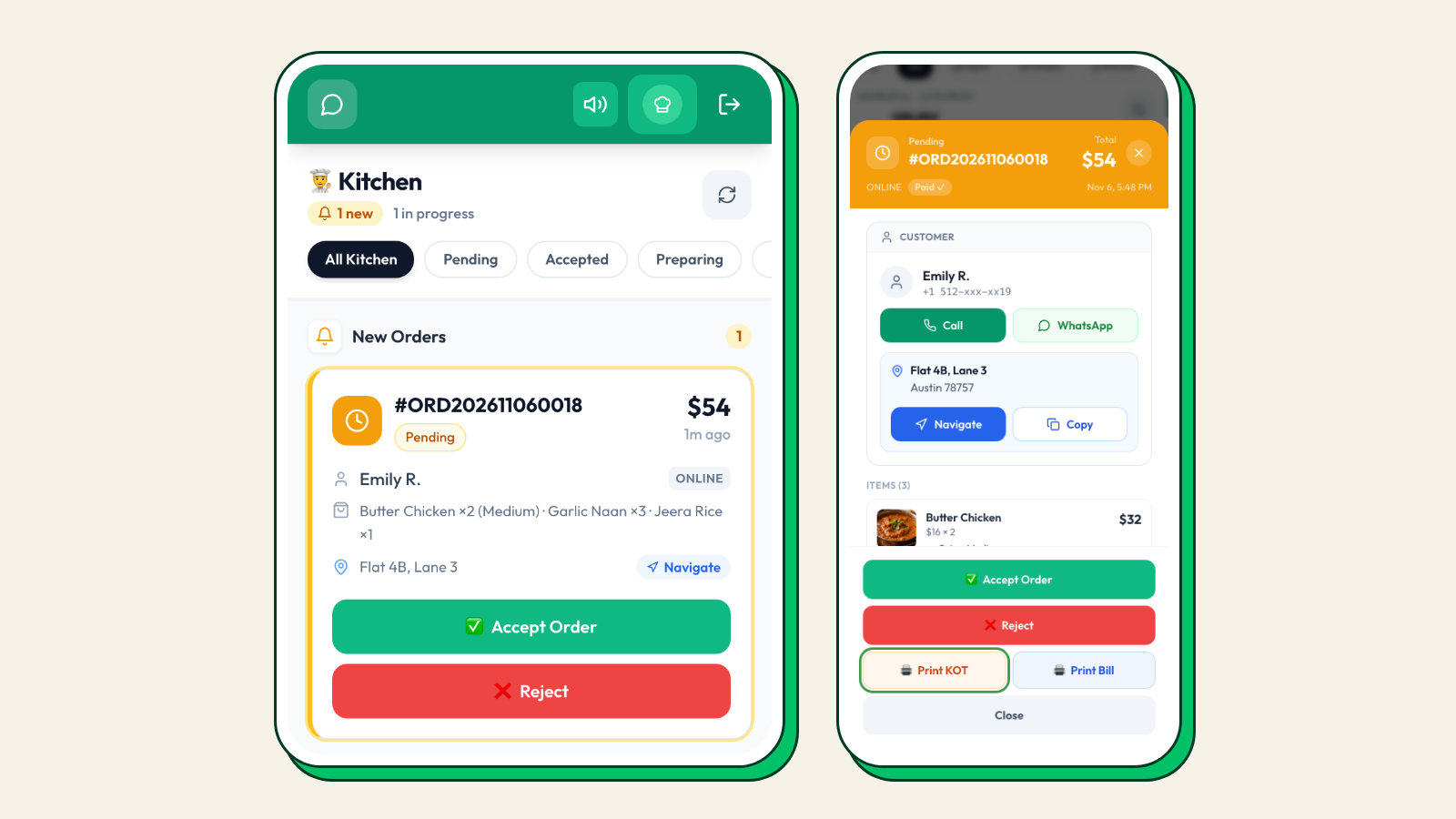
In the kitchen, orders land on a live dashboard and on the staff app with new-order alerts, and print as a KOT on a thermal printer. For dine-in, QR tables, table numbers and a "served" status are included, which covers the table-ordering job many small restaurants were using a POS for. Delivery zones with distance-based charges, pickup points with collection times, scheduled orders, combos, coupons, reviews after each order and WhatsApp campaigns from a prepaid wallet round it out.
Plans for US merchants are $49, $69 and $99 a month plus $0.50 per order, with no commission and a 7-day free trial on every plan. Setup takes about 30 minutes. The US specifics are in Tezzu for US merchants.
Walk through your setup on a call
Tell us what you use your POS for today. We will show which jobs Tezzu covers, what stays on a simple POS, and what the monthly cost looks like at your volume.
Book a demoFrequently asked questions
What is the cheapest POS alternative for a small restaurant?
For the counter, a cloud POS with a free plan and the vendor's own processing is usually the lowest-cost option. For online orders, a direct ordering platform with a flat per-order fee and Stripe processing costs far less per order than delivery app commission or a bundled online ordering module. Many small restaurants combine the two rather than buying another all-in-one.
Can I keep my current POS and use a different online ordering system?
Yes. A separate ordering channel can run beside your POS, with its own dashboard, staff alerts and kitchen printer, while the POS handles the counter. You lose single-system reporting, but you gain a flat per-order cost on direct orders. Check your POS agreement for any clauses about online ordering modules you have committed to.
Does switching POS mean replacing all my hardware?
Usually yes for the terminals, since most all-in-one hardware runs only the vendor's own software. Printers are often reusable if they are standard network or USB thermal printers. An ordering-first alternative needs only a phone or tablet for alerts and a thermal printer for kitchen tickets, so the hardware cost of adding one is small.
Is a POS necessary for a small restaurant at all?
For a counter-service or takeaway-focused place, often not. A direct ordering channel with QR table ordering, a staff app for alerts and a thermal printer covers order taking, kitchen tickets and payments. A full POS becomes necessary when you need split checks, complex tableside service, tip pooling or integrated payroll.