A kitchen order alert app fixes a problem every restaurant with a separate kitchen knows: orders arrive at the counter, and the cooks find out late. Put a kitchen order alert app on a phone that lives in the kitchen, and a new order makes a sound where the cooks are standing, instead of on a laptop behind a wall.
For a restaurant whose kitchen is behind a door, up a floor or across a courtyard from the counter, that gap is where WhatsApp orders go cold. This guide covers why a counter chime fails in that layout, what the alert has to do, where to put the phone, who should have the app, how it looks on Tezzu, and a checklist for a busy shift.
Why orders go cold in a separate kitchen
Picture the layout. Orders arrive on WhatsApp and the store page and show up on the dashboard, which is open on a laptop at the counter. The kitchen is behind a door, with an exhaust fan running and two burners going. A new-order chime on the counter laptop is heard by the cashier, who is taking a dine-in payment, and by nobody in the kitchen.
Even if the cook has the dashboard open on a phone in their pocket, one short notification sound is one noise among many. If it is missed, the order waits until someone happens to look. Ten minutes later the customer messages "any update?", and the first the kitchen hears of the order is a complaint. The general problem, and the ways restaurants patch it with bells and shouting, is covered in restaurant order notifications: never miss an order again.
What a kitchen order notification has to do
Judge any new order alert app by what happens in your actual kitchen, at your actual noise level. Four things matter.
It sounds where the cooks are. The alert has to play on a phone in the kitchen, not only on the counter laptop or the owner's phone. This is the whole point for a separate kitchen.
It is distinct. The sound should be one the cooks learn to recognise as "new order", different from a WhatsApp message tone or someone's ringtone.
It leads straight to the order. One tap from the alert should show the items, add-ons, instructions and order type, so the cook knows whether it is a delivery, a pickup or table 6.
It has a paper backup. The alert says something has arrived; the KOT is what the cook works from at the stove. How the two work together in a rush is covered in thermal KOT printing for a 100-order lunch rush.
Where to put the phone in a separate kitchen
The best alert in the world fails on a phone in the head cook's pocket. For a separate kitchen, set up one phone that belongs to the kitchen and never leaves it.
- At the pass, on a stand. Somewhere the cooks see and hear it, at eye level, away from the burners and the sink.
- Plugged in. A phone that dies at 9 pm cannot alert anyone. Run a charger to the stand and leave it there.
- On a connection that reaches. Kitchens behind thick walls or on another floor often get weak Wi-Fi. Check the signal at the stand, and use a SIM with data if the Wi-Fi drops.
- A second phone at the counter. The counter usually accepts orders, so it needs the alert too. Two phones in two places means one silent phone does not cost an order.
- A business phone. A basic Android phone in the ₹7,000 to ₹10,000 range that stays in the kitchen is cheaper than one missed order a week, and it stays when a cook leaves.
Who should have the app: order alerts for kitchen staff
The app goes on the phones of the people who act on orders. Each person gets their own login with a role, and the role decides which step of the order they handle. A typical split for a restaurant with a separate kitchen:
| Person | Where they are | Their part in an order |
|---|---|---|
| Cashier | At the counter | Accepts new orders, handles payment, marks dine-in orders served |
| Cook | In the kitchen, with the kitchen phone | Prepares the order and marks it ready |
| Rider | On the road | Takes ready delivery orders out and marks them delivered |
| Manager or owner | Anywhere | Steps in when an order sits, and runs the dashboard |
For this layout, the people who matter most for the alert are the cashier and whoever holds the kitchen phone. Make sure both are set to receive new orders, and that both are logged in before service starts. How to think about roles across a whole team, including who should never see revenue, is in restaurant staff management: roles, permissions and who sees what.
Checklist for a busy kitchen shift
Most "the app did not ring" reports come down to the phone, and a few minutes at the start of each shift prevents them.
- Before service: kitchen phone on its stand, plugged in, volume up, not on silent, do not disturb off.
- Logged in: the kitchen phone and the counter phone are both logged in, with the right staff accounts.
- Test order: send one order to yourself on WhatsApp and check the alert is heard at the stove with the exhaust running. It takes thirty seconds.
- Who accepts: one named person per shift, usually the cashier, with the cook or manager as backup if an order sits for two minutes.
- During the rush: nobody borrows the kitchen phone for a call, and nobody turns it down because it is "too loud".
- After close: leave the phone on charge, and note any order that was missed and why, so tomorrow's fix is specific.
Two phone settings cause most silent kitchens. Battery optimisation on many Android phones puts background apps to sleep, so exclude the staff app from it. And after an operating system update or a reinstall, check the app is still allowed to show notifications and play sound.
What this looks like on Tezzu
On Tezzu, the staff app is the phone app your kitchen, counter and riders use to receive and handle orders. Each staff member has their own login with a role, set from the dashboard, and the staff app gives them a new-order alert with a sound. In the order flow settings you assign the step where new orders arrive to the people who should be alerted; in a separate-kitchen layout, that means the cashier and the kitchen phone's login.
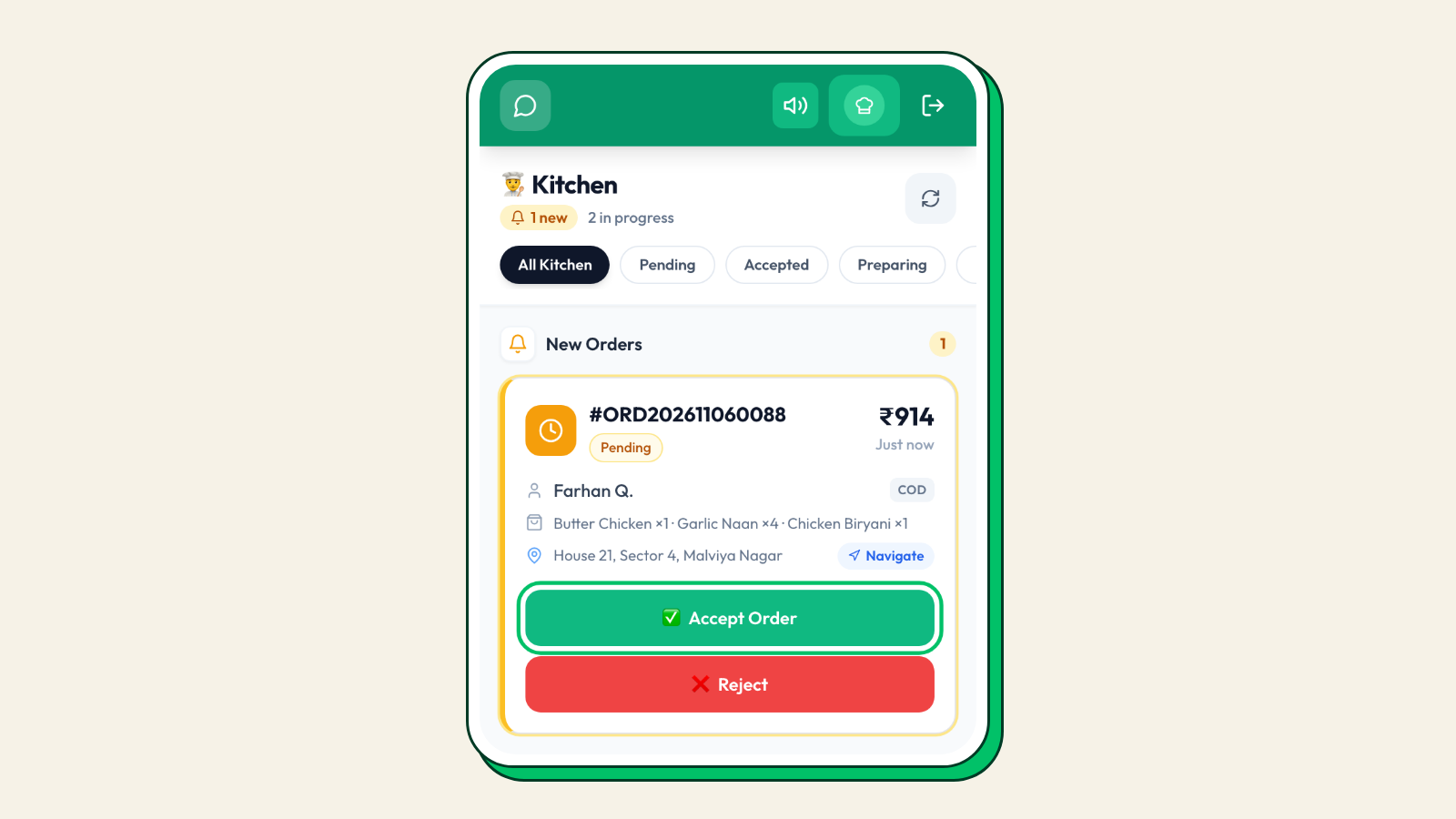
Walk through one order. A customer places a WhatsApp order for two Butter Chicken, four Naan and a Dal Makhani at 8:12 pm. The order lands on the dashboard and the staff app, and the kitchen phone at the pass plays the new-order alert. The cashier accepts it from the counter, the KOT goes to the kitchen, and the cook at the tandoor opens the order on the kitchen phone to check the "less spicy" instruction. The customer gets a WhatsApp message that the order has been accepted.
At 8:35 the cook marks it ready, the rider takes it out and marks it out for delivery, and the customer gets that update too. The full sequence of statuses for delivery, pickup and dine-in is in order status workflow: pending to served. Orders from the store page and QR tables reach the staff app the same way. Setup details are in the Tezzu staff app guide, and the app sits alongside the dashboard, KOT printing and roles on the features page.
Put a phone in the kitchen that rings for every order
Install the staff app on a kitchen phone, give each person a login and role, and send yourself a test order. Every plan starts with a 7-day free trial, then ₹10 per order and no commission.
Start your free 7-day trialFrequently asked questions
What is a kitchen order alert app?
It is a staff app that receives orders from your WhatsApp number, store page and dine-in tables and plays a new-order alert on the kitchen's phone, so the cooks know an order has arrived without someone walking it in from the counter. Staff open the order, see the items and instructions, accept it and move it through preparing and ready.
Why does my kitchen miss new order notifications?
Usually because the only device that sounds is at the counter, or because the kitchen phone was silenced, logged out, out of battery or put to sleep by battery optimisation. A dedicated kitchen phone on a stand, plugged in, with battery optimisation off for the app and a test order at the start of each shift, fixes most of it.
Can the kitchen and the counter both get the alert?
Yes, as long as both phones are logged in with staff accounts that are set to receive new orders. On Tezzu, the order flow settings decide who is alerted for the step where new orders arrive, so you can include the cashier at the counter and the login on the kitchen phone. Each person still has their own login and role.
Does the alert work for dine-in and pickup orders too?
Yes. Orders from a QR table, a pickup booking or a WhatsApp chat all reach the staff app as new orders. On Tezzu, delivery, pickup and dine-in each have their own order flow, so check that the new-order step in each one you use is assigned to the right people. The order shows its type and the table number or collection time.