Most WhatsApp vs phone orders restaurant comparisons start with convenience, and convenience is real, but it is not the reason owners switch. They switch because phone orders cost money in ways that never show up on a bill: the call that rang out during the Saturday rush, the biryani cooked for a number that never picked up at the door, the two hours a day a staff member spends repeating addresses back to customers.
This post puts rupee numbers on those costs, compares the two channels side by side, answers the objections owners raise, and lays out how to move phone customers to WhatsApp without losing the ones who like to call.
Where phone orders quietly lose money
Missed calls at the exact moment you are busiest
Phone orders arrive when everyone else is ordering too. Between 8 and 9 on a Friday night, the phone rings while the same person is packing, taking cash and answering a rider. Some calls get answered on the fourth ring, some go to a busy tone, and some customers hang up and open the delivery app instead. You never find out how many, because a missed call leaves no order behind.
Repeat-it-back errors
Every phone order is dictated once and written down once, usually on a pad, often with the music on. "Paneer butter masala, two rotis, no onion" becomes "paneer, butter naan, onion". The address is the worst part: house numbers, landmarks and "near the temple" get garbled, and the rider finds out ten minutes later. Each error is a remake, a refund, a cold meal or a bad review, and often more than one of those.
No payment before cooking
A phone order is a promise. Unless someone pauses to send a UPI request and wait for the screenshot, the kitchen cooks on trust. Most customers are honest, but the small share who refuse at the door, give a wrong number, or order as a prank are enough to cost a few thousand rupees a month in food that nobody paid for.
Nothing is recorded
After a phone order is delivered, it is gone. There is no customer list, no order history, no way to tell which dishes sell on which day, and no number you can message with next week's offer. The customer who ordered six times this month is indistinguishable from the one who ordered once.
The cost of a phone order, worked out
This is an illustration built from typical assumptions, not a measurement from any one restaurant. Change the numbers to match your own operation.
Suppose you take 40 phone orders a day at an average order of ₹350. Each call takes about three minutes including repeating the items and the address. That is two hours a day of one staff member's time. At a salary of ₹15,000 a month for roughly 260 working hours, that time costs about ₹3,500 a month.
Suppose one call in ten goes unanswered during peak hours and half of those customers do not call back. That is two lost orders a day, or around ₹18,000 a month in revenue that went elsewhere.
Suppose one order in thirty has a mistake that costs ₹150 on average to put right through a remake, a partial refund or a free item next time. At 40 orders a day that is close to ₹5,000 a month. Add one refused cash-on-delivery order every two days at ₹350, and that is another ₹5,000 or so in wasted food.
Together that is in the region of ₹30,000 a month, and it does not count the marketing value of the customer list you never built. Your numbers will differ, but the pattern will not: the biggest costs are missed orders and unpaid orders, and those are the two things a phone cannot fix.
What WhatsApp ordering changes, and what it does not
With a WhatsApp ordering flow, the customer picks items from a menu, types or shares their address once, and pays before the order reaches the kitchen. The order arrives as text that nobody has to transcribe. Ten customers can order in the same minute without anyone being on hold. Every order is stored against a phone number, so you have a list and a history. The complete guide to WhatsApp ordering systems explains the full flow.
What WhatsApp does not change is the kitchen. Orders still have to be cooked, packed and delivered on time, and a busy kitchen with a clear order screen can still fall behind. It also does not remove special requests; customers still write "less spicy" and "call on arrival", and someone still has to read them. The gain is at the front door of the operation, not inside it. The post on reducing order errors in a restaurant covers what still has to happen in the kitchen.
WhatsApp ordering vs phone orders: side by side
| What matters | Phone orders | WhatsApp ordering |
|---|---|---|
| Capturing the order | Dictated and handwritten, errors common | Chosen from a menu, arrives as text |
| Address accuracy | Spoken and repeated back | Typed once or shared as a location pin, saved for next time |
| Payment | Cash at door or a separate UPI request | UPI or card at checkout, or COD by choice |
| Peak hours | One call at a time, the rest wait or leave | Any number of customers order at once |
| Staff time per order | Two to four minutes on the call | Seconds to accept and print |
| Record of the order | A pad, or nothing | Stored with items, address, payment and status |
| Customer list for offers | None | Every customer who has ordered, with history |
| Customer effort | Low for people who like to talk | Low for people who already live on WhatsApp |
| Order updates | Customer calls to ask | Status messages sent as the order moves |
The objections owners raise, with honest answers
"My customers like to talk." Some do, particularly older regulars, and you should keep answering the phone for them. The point is to move the other eighty percent, the ones who would rather tap than wait on hold, so the phone is free for the people who need it.
"Special requests need a conversation." They need a sentence. A notes field at checkout captures "no onion, extra chutney" more reliably than a phone call does, because it arrives in writing and prints on the KOT.
"It will be slower in a rush." It is the opposite. The phone is a single lane. WhatsApp is as many lanes as there are customers. Where owners do get stuck is handling a flood of chat orders by hand, which is why managing multiple WhatsApp orders without losing track matters as much as the switch itself.
"I will miss WhatsApp messages the way I miss calls." Only if orders sit in a chat app with the ringer off. With a proper ordering flow, each new order triggers an alert on the staff phone and on the dashboard, and nothing gets lost in the thread. The post on restaurant order notifications goes into how that should work.
How to move phone customers to WhatsApp without losing them
- Keep the same number. The number customers already call should be the number they message. Do not make them learn a new one.
- Change the greeting, not the service. Record a short voice message for unanswered calls: "We are busy packing orders. Send Hi on WhatsApp to this number and your order goes straight to the kitchen." Then still call back when you can.
- Put the WhatsApp link everywhere a phone number was. Menu cards, the shop board, packaging stickers, the Google listing, the Instagram bio.
- Tell callers at the end of each call. "Next time, message us on WhatsApp and you can pay online and skip the wait." One sentence, every call, for a month.
- Confirm the first few WhatsApp orders warmly. A quick confirmation message with the items, total and time builds the habit. Templates are in WhatsApp order confirmation message templates.
- Keep the phone as a fallback, not the default. After a few months, the phone will ring mostly for questions, which is what it is good at.
What this looks like on Tezzu
With Tezzu, your existing number becomes the ordering number. A customer sends Hi, the bot shows your menu, takes the items, address and payment, and the order lands in the live dashboard and in the staff app with a new-order alert and a new-order alert, so a busy kitchen hears it even when nobody is looking at a screen. The same order can print as a KOT and a GST bill on a thermal printer.
Online payments run through Razorpay and mark the order paid automatically, and cash on delivery stays available if you want it. Every order is stored against the customer's number with its items and status, which gives you the history and the customer list that phone orders never produced. Customers who prefer the web get the same menu at your free store page, so one system covers both.
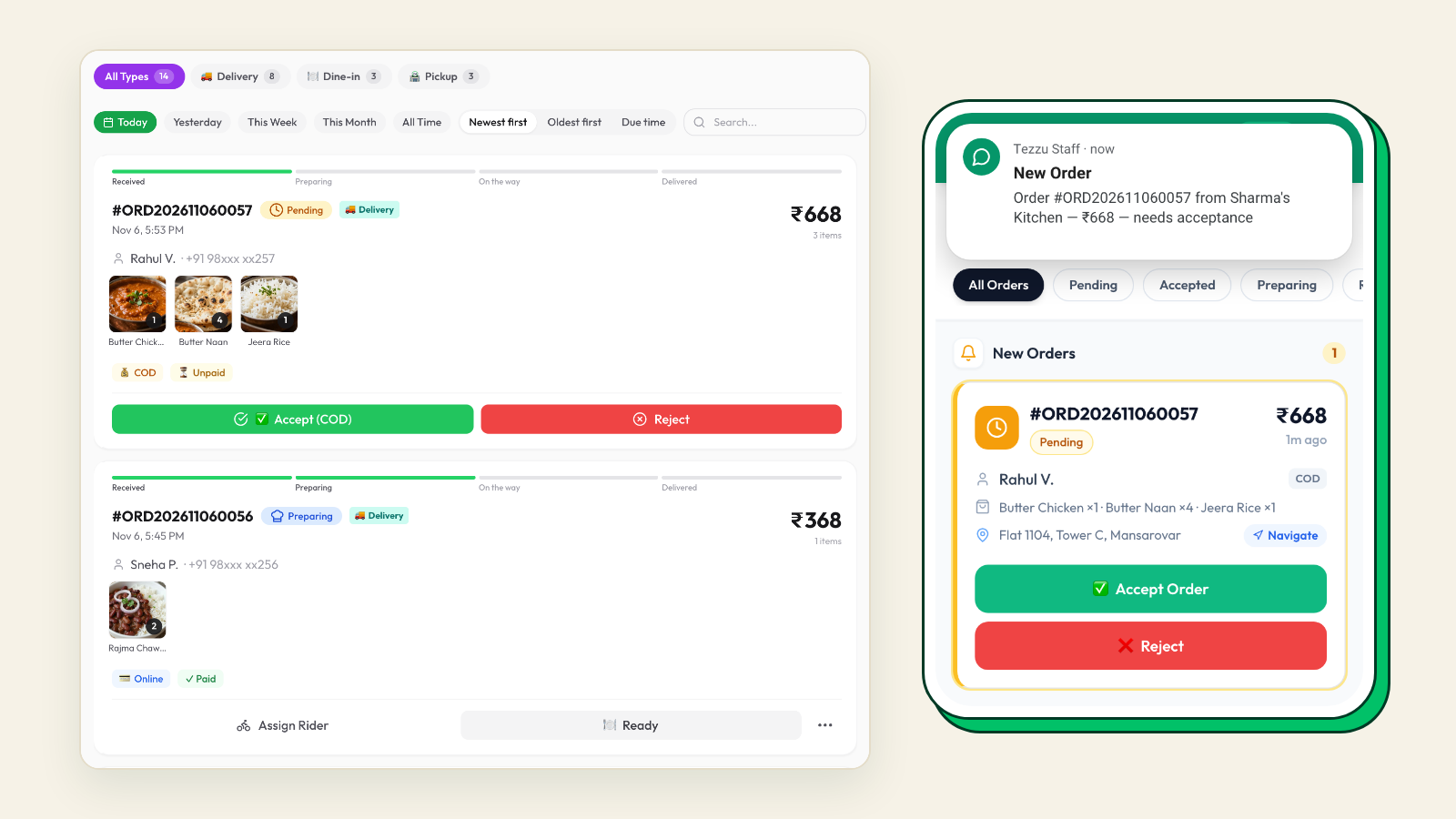
The alerts and announcements are described in Tezzu staff app: order alerts. Pricing is a flat ₹10 per order with no commission, on plans from ₹999 a month.
See the phone-to-WhatsApp switch on your own menu
Book a 20-minute demo and we will walk through the ordering flow, alerts and payments with your menu and your number.
Book a demoFrequently asked questions
Why are phone orders a problem for restaurants?
Phone orders tie up one person per call, get missed when the kitchen is busiest, produce errors when items and addresses are repeated back, arrive without payment, and leave no record of the customer. Each of these costs money on its own, and together they can add up to a sizeable monthly loss that never appears on any invoice, which is why owners underestimate it.
Should I stop taking phone orders completely?
Not at first, and probably not ever. Keep the phone for customers who prefer it and for questions, and move the rest to WhatsApp by putting the link everywhere, mentioning it on every call and making the first few WhatsApp orders easy. Over a few months the phone becomes the exception rather than the main channel, without anyone being forced.
Is WhatsApp ordering faster than phone ordering during a rush?
Yes, because a phone handles one customer at a time while WhatsApp handles as many as arrive. The place a rush can still go wrong is on your side, if orders sit in a chat thread and someone has to read and retype them. An ordering flow that puts each order on a screen with alerts removes that bottleneck.
How do I replace phone orders without a new number?
You do not need a new number. The WhatsApp Business API can run on the number customers already call, and a provider connects it through Meta's signup while you keep ownership. Customers message the same number they used to dial, and calls still work for anyone who prefers them.