The hard part of learning to manage WhatsApp orders is not the first order of the day. It is the moment at 8.40 pm when nine chats are open, three customers have changed their mind, two have paid and four have not, and a rider is standing at the counter asking which bag is for Sector 12. Chat is a good place to receive an order and a bad place to keep track of one.
This post lays out a system that works at each level of volume: a tracking sheet and a status routine for the chat-only stage, labels and quick replies to stretch the free app further, and the point at which a proper order screen stops being a luxury. The goal is that nobody in the kitchen ever has to scroll back through a chat to find out what a customer ordered.
Why orders get lost in WhatsApp chats
A chat thread is sorted by the last message, not by the order. The customer who ordered first and then went quiet sinks to the bottom, while the one asking "how long?" every two minutes stays on top. Order details, address and payment confirmation arrive as separate messages, often with a question or a joke in between, so the kitchen has to assemble the order from pieces.
Two more things make it worse. Only one person can comfortably work a WhatsApp number from one phone at a time, so during a rush everything funnels through whoever is holding it. And a chat has no status: there is no built-in way to mark an order as cooking, packed or out for delivery, so people rely on memory.
Step 1: separate the order from the conversation
The single most useful habit is to restate every order in one message before anything else happens. Items, quantities, address, payment method, expected time, and an order number. Send it to the customer as confirmation and treat it as the record of truth.
A confirmation that reads "Order 14: 2 x chicken biryani, 1 x raita. Deliver to B-204, Green Park, near the water tank. ₹520 paid via UPI. Ready by 8.30 pm" removes most of the ambiguity in one go. It also stops the kitchen reading the chat at all. Ready-made wording is in WhatsApp order confirmation message templates.
Step 2: keep a WhatsApp order tracking sheet
At the chat-only stage, a sheet is the cheapest way to see all open orders in one place. Google Sheets on a tablet near the kitchen pass works, as does a printed sheet on a clipboard. Keep it to the columns you will actually fill in during a rush.
| Column | What goes in it | Why it matters |
|---|---|---|
| Order number | A running number for the day, starting at 1 | Gives the kitchen, the rider and the customer one word to refer to |
| Time received | When the confirmation was sent | Shows which orders are oldest and overdue |
| Customer and phone | Name and last four digits | Enough to find the chat again without typing the full number |
| Items | Short form, as on the KOT | The kitchen reads this, not the chat |
| Address or table | Area and landmark, or table number | The rider reads this, not the chat |
| Payment | Paid, COD, or pending | Nothing cooks while pending |
| Status | New, cooking, packed, out, delivered | Replaces memory; updated by whoever changes it |
The rule that makes the sheet work is that an order is not in the kitchen until it is on the sheet. If the sheet and the chat disagree, the sheet wins, and someone fixes the chat.
Step 3: use labels, quick replies and a second device
The free WhatsApp Business app has three features that help at this stage. Labels let you tag each chat as New Order, Cooking, Out for Delivery or Paid, and filter the chat list by label, which partly fixes the sorting problem. Quick replies let you send the confirmation, the "on its way" message and the payment request in two taps. Linked devices let a second person work the same number from a laptop or another phone, so the owner is not the only bottleneck. The limits on linked devices change, so check the current app.
Labels need discipline. Someone has to change the label every time the status changes, and in a rush that is the first thing to slip. They are a bridge, not a destination, and the post on sharing a WhatsApp number with staff explains where the free app stops.
Step 4: give each order a status and a single owner
Whatever tool you use, every order should move through the same short list of statuses, and each status should have one person who moves it. New is owned by whoever confirms orders. Cooking and packed belong to the kitchen. Out for delivery belongs to the rider or the person handing over bags. Delivered closes it.
When a customer asks "where is my order?", the answer is read off the status, not reconstructed from memory. When a rider asks which bags go together, the answer is the order numbers on the sheet. Peak-hour habits like these are covered in more depth in restaurant order notifications: never miss an order again.
When to move from chat to an order screen
The sheet-and-labels system holds up to somewhere around twenty or thirty orders a day with one person on the phone. Past that, the signs appear quickly: orders confirmed late, payment statuses wrong, two people replying to the same customer, and the owner unable to step away from the phone for a meal.
An ordering system changes the shape of the problem. Instead of a customer typing an order into a chat and a person copying it to a sheet, the customer picks from a menu and the order arrives already structured, with address and payment attached, on a screen that sorts by time and status. The chat becomes a place for questions. The complete guide to WhatsApp ordering systems explains how that flow is built, and the broader picture of what an order system should do is in restaurant order management system: what it should actually do.
How Tezzu handles multiple orders
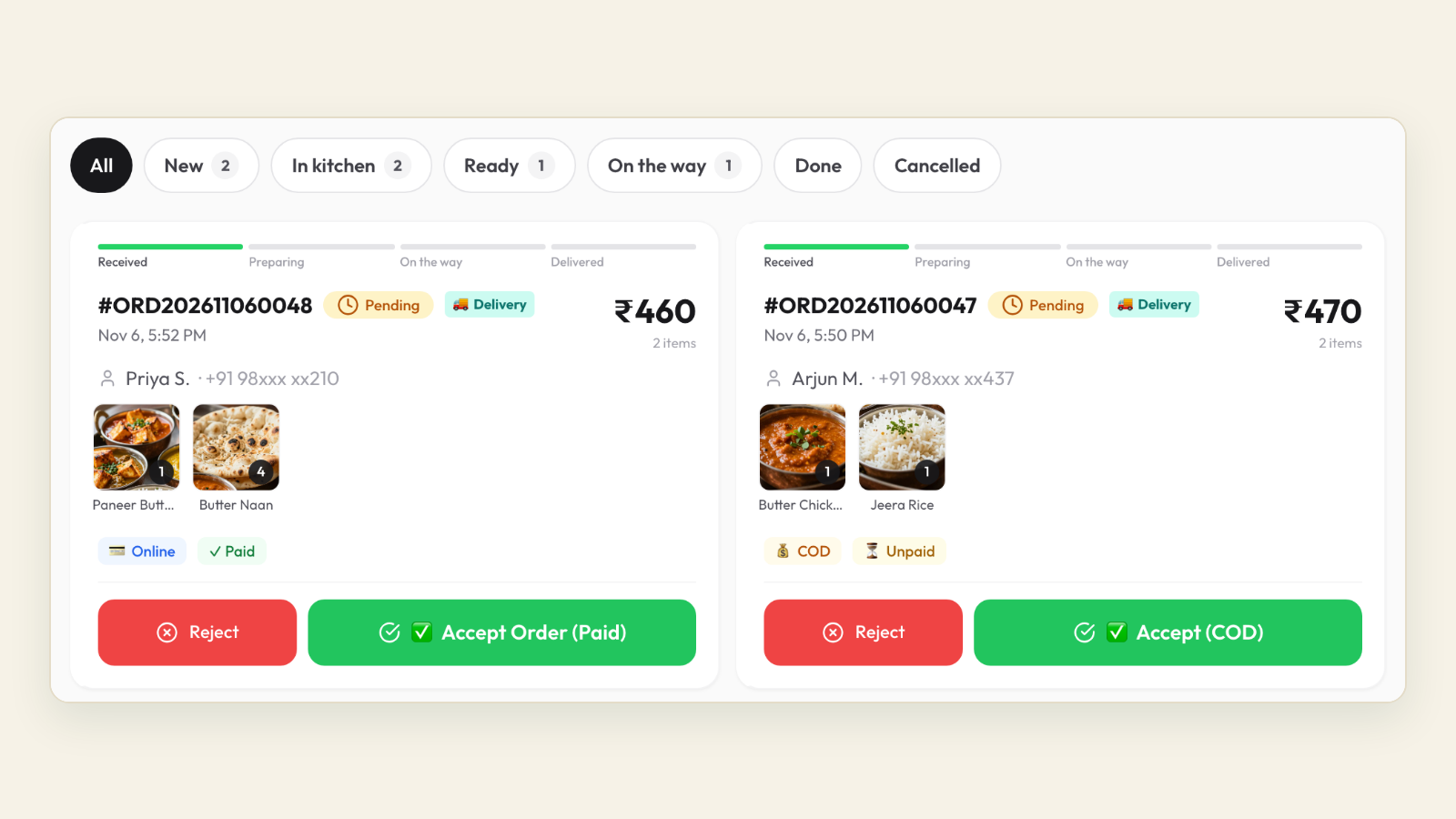
On Tezzu, each WhatsApp or store-page order arrives in the live dashboard as a card with items, address, payment status and a running order number, sorted by time. Staff move it through the statuses, including a served status for dine-in tables, and the customer receives the matching status message on WhatsApp without anyone typing it.
The staff app raises a new-order alert with a new-order alert, so the kitchen hears "new order" even when nobody is looking at the screen, and several staff can work orders at once under their own logins with role-based permissions. A KOT prints on a thermal printer when the order is accepted, and payment is marked automatically when Razorpay confirms it, so "did they pay?" is answered by the card, not the chat. For a business with more than one outlet, each outlet runs as its own store with its own number and staff, and reporting shows all of them together.
Setup takes about 30 minutes, and the per-order cost is a flat ₹10 with no commission. The staff-side alerts are described in Tezzu staff app: order alerts.
Put every order on one screen
Connect your WhatsApp number, load your menu and see orders arrive with status and payment attached. Every plan starts with a 7-day free trial.
Start your free 7-day trialFrequently asked questions
How do I track orders on WhatsApp without software?
Restate each order in one confirmation message with an order number, then log it on a tracking sheet with items, address, payment and status columns. Use WhatsApp Business labels to tag chats by status and quick replies for the standard messages. Treat the sheet as the record and the chat as the conversation. This holds up to roughly twenty or thirty orders a day with one person on the phone.
What should a WhatsApp order tracking sheet include?
Seven columns are enough: order number, time received, customer name with the last four digits of the phone, items in short form, address or table number, payment status, and order status. Anything more will not get filled in during a rush. Keep it on a tablet or clipboard near the kitchen pass, and make it the rule that nothing is cooked until it is on the sheet.
Can two people manage one WhatsApp Business number at the same time?
With the free app, yes, through linked devices, which let another phone or a laptop use the same number. The number of linked devices is limited and has changed over time, and everyone sees every chat with no separate logins or permissions. An ordering platform on the WhatsApp Business API gives each staff member their own login and role, which scales better.
At what point do I need a WhatsApp order management system?
When the signs of strain appear: late confirmations, wrong payment statuses, two people replying to the same customer, or the owner unable to put the phone down. For most kitchens that happens somewhere between twenty and forty orders a day. At that stage, having customers order from a menu so the order arrives structured saves more time than any amount of chat discipline.