The search for WhatsApp Business multiple users usually starts the same way: the owner's phone is the only place orders arrive, the owner cannot be at the counter, in the kitchen and on the phone at once, and handing the phone to a staff member means handing over every chat, every customer and the owner's personal number.
There are three ways to share one WhatsApp Business number across staff, and they suit very different sizes of operation. This post explains each, compares them in one table, and sets out what a restaurant actually needs from shared access, which is less about chat and more about orders.
What "multiple users" means in practice
Owners who ask for multiple users are usually asking for three separate things. The first is more hands: two or three people able to reply and take orders from the same number at the same time. The second is accountability: knowing who accepted an order, who marked it delivered, and who sent that reply to a complaint. The third is control: a delivery boy who can see addresses but not revenue, a cashier who can take payments but not change the menu.
The free app solves only the first. The API, through either a shared inbox or an ordering platform, solves all three, and the difference between those two is what the staff see: chats, or orders.
Option 1: linked devices on the free WhatsApp Business app
The WhatsApp Business app lets you link a limited number of extra devices to one number, through Settings, Linked devices, and a QR scan from a laptop, a tablet or another phone. Once linked, each device sees the full chat list and can send and receive messages without the main phone being online.
This is enough for a small kitchen where two or three people share the work. The limits are the ones you would expect. The number of linked devices is capped, and the cap has changed over time, so check the current app. Everyone sees everything, including the owner's conversations with suppliers and the customer's full history. There are no separate logins, so nothing records who did what. Labels and quick replies help with keeping order, as described in managing multiple WhatsApp orders without losing track, but the structure is still a chat.
Option 2: a shared inbox on the WhatsApp Business API
WhatsApp chat tools are built around a shared team inbox on the WhatsApp Business API. Any number of agents log in to a web dashboard, incoming chats are assigned to people or teams, and each agent sees and replies to their own conversations. These tools generally charge a monthly subscription plus per-message costs for outbound campaigns, and they are positioned for support and marketing teams across industries.
For a restaurant the strength is unlimited agents with proper logins. The weakness is that an incoming message is still a chat. The agent has to read "2 chicken biryani to B-204" and do something with it, which usually means retyping it into a billing system. If most of what comes in is orders rather than questions, a shared inbox puts more people on the problem without changing the problem. The distinction is laid out in Tezzu vs WhatsApp chat tools: chat tool vs ordering platform.
Option 3: an ordering platform with staff roles
An ordering platform on the API takes a different approach. The customer orders through a menu in the chat or on a store page, and what arrives for staff is an order, not a message: items, address, payment status and a status to move. Staff log in to a dashboard or a staff app with their own credentials and a role that decides what they can see and do.
This is the model that fits a kitchen, because the people who need access need it to orders. The cook needs the items, the counter needs the status, the rider needs the address, and the owner needs the revenue. None of them needs the chat, and only one or two people need to answer questions in it. The complete guide to WhatsApp ordering systems explains how the ordering flow produces that structured order in the first place.
The three options compared
| Linked devices (free app) | Shared inbox (API) | Ordering platform with roles (API) | |
|---|---|---|---|
| How many people | A few, capped by WhatsApp | As many agents as you pay for | As many staff as you add |
| Separate logins | No | Yes | Yes |
| Permissions by role | No | Usually agent and admin | Yes, per role |
| Staff see orders as | Chats | Chats, assigned to agents | Orders with items, address, payment and status |
| Who did what | Not recorded | Recorded per agent | Recorded per staff login |
| Cost model | Free | Subscription plus per-message charges | Subscription, sometimes a per-order fee |
| Suits | Two or three people, low volume | Support and marketing teams | Kitchens where most messages are orders |
What a restaurant actually needs from shared access
The kitchen sees orders, not chats
A cook should never scroll a conversation. The order needs to arrive as a list of items with a KOT, and nothing else. This alone removes most of the errors that come from shared phones.
Status changes are tied to a person
When an order is marked packed or delivered, the system should record who did it. When the customer calls to say the food never arrived, you want to know which login marked it delivered at 8.52 pm.
Access matches the job
Delivery staff need the address and phone number for the orders they carry, and nothing about revenue or the menu. Counter staff need to accept orders and take payments. Managers need reports. The owner needs everything. The post on restaurant staff management: roles, permissions and who sees what works through a sensible split.
The number stays with the business
When a staff member leaves, you remove their login and nothing else changes. With a shared phone, the departing person may still have WhatsApp Web open on a laptop at home. Separate logins make the leaving process a single click.
Alerts reach whoever is on shift
A new order should ring on the phones of the people working, not only on the owner's. Push alerts to staff devices, with the order visible in the app, are what make shared access useful during a rush. The underlying API choice that makes all of this possible is explained in WhatsApp Business vs WhatsApp Business API.
What this looks like on Tezzu
Tezzu connects your own WhatsApp number through Meta's embedded signup, and every staff member gets their own login with a role that sets what they can see and do. Orders from the WhatsApp bot and the store page land in the live dashboard and in the staff app, where new orders trigger an alert with a new-order alert so the kitchen hears them without watching a screen.
Staff move each order through its statuses, and the customer gets the matching WhatsApp update automatically. The owner's account stays with the owner, and a business with more than one outlet can run each one as its own store under the same account, with its own number and its own staff. Nobody needs the owner's phone, and nobody who leaves keeps access.
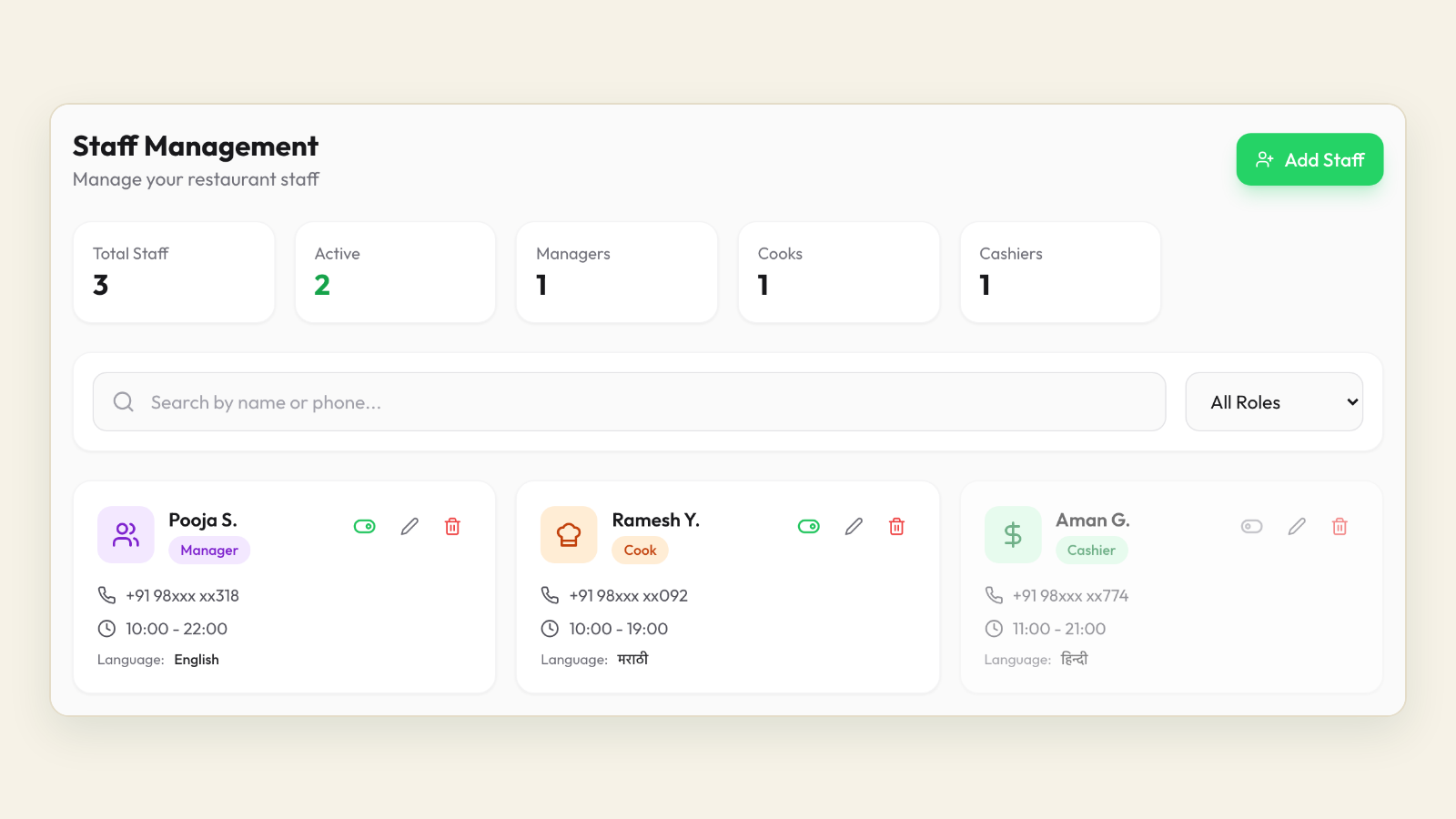
The staff-side experience is described in Tezzu staff app: order alerts. Plans start at ₹999 a month with a flat ₹10 per order and no commission, and setup takes about 30 minutes.
Give your staff their own logins
Connect your number, add your team with roles, and take orders from one number across the whole kitchen. Every plan starts with a 7-day free trial.
Start your free 7-day trialFrequently asked questions
Can multiple people use one WhatsApp Business account?
Yes. The free WhatsApp Business app supports a limited number of linked devices that share one number, with everyone seeing all chats and no separate logins. For more people, separate logins and permissions, you need the WhatsApp Business API through a shared inbox tool or an ordering platform, where each staff member has their own account on the same number.
How many devices can be linked to WhatsApp Business?
The free app allows a small number of linked devices alongside the main phone. WhatsApp has changed the limit over time and may offer more through paid options, so check Settings, Linked devices in the current app rather than relying on an older figure. Linked devices share everything with no per-person access control, which is the real constraint for a growing kitchen.
Is there a multi-agent version of WhatsApp Business?
Multi-agent access comes through the WhatsApp Business API rather than the app. Shared inbox tools give each agent a login and assign chats between them, which suits support teams. Ordering platforms give each staff member a login and a role, and present incoming orders as structured orders rather than chats, which suits restaurants and cloud kitchens where most messages are orders.
How do I share my restaurant's WhatsApp number with staff safely?
Avoid handing over the owner's phone or personal number. Use a number registered to the business, give each person their own login through an API-based platform with roles, and remove the login when they leave. If you are still on the free app, link devices rather than sharing the phone, turn on two-step verification, and keep supplier and personal conversations on a separate number.