If you are searching for how to delist from a food delivery app, the mechanics are the easy part: you raise a request with the app's restaurant partner support, serve whatever notice period your agreement states, collect your final payout and the listing comes down. The hard part is what happens to your orders the day after. This guide covers both: the steps to close a delivery app partner account cleanly, and a seven-day plan to move your regular customers to a channel you own before the listing disappears.
One caution before you start. Partner apps and support flows change often, so treat the steps below as the general route and confirm the current process with your account manager or partner support, in writing.
Pause or delist: decide this first
Delisting is permanent in practice. You can re-apply later, but you will go through onboarding again, your listing history resets, and your reviews may not come back. Before you remove your restaurant from a delivery app, be clear about which of three options you actually want.
- Temporarily offline. You mark the outlet closed from the partner app for a few days or weeks. Nothing is lost. Useful if the problem is staff shortage, a kitchen renovation or a bad week of ratings you want to fix quietly.
- Stay listed, reduce dependence. You keep the listing for discovery, switch off funded discounts, trim the delivery radius and push repeat customers to order direct. This is the approach described in the 30/70 rule and it is the right answer for most restaurants.
- Full delisting. You close the partner account. The right move when commission plus discounts leave you with no margin, when you already have a strong local customer base, or when your business model (tiffin, catering, pre-orders) never fit the app in the first place.
If you have not worked through the numbers yet, read the decision framework for leaving an aggregator before you continue. The rest of this post assumes you have decided on a full exit.
How to delist from a food delivery app, step by step
- Read the termination clause in your partner agreement. Most aggregator contracts allow either side to end the arrangement with written notice. Note the notice period, any clause about pending orders, and anything about outstanding dues or ad balances.
- Export everything you will lose access to. Download payout statements, commission invoices, GST invoices and order reports for at least the last financial year from the partner dashboard. Your accountant needs these for returns and for reconciling TCS and TDS deductions. Once the account is closed, getting them back is slow.
- Settle open items. Check for pending payouts, unresolved customer refunds, open disputes and any unused ad wallet balance. Ask in writing how each will be settled and by when.
- Raise the delisting request. Use the help or support section in the partner app, or email your account manager, and state clearly that you want to permanently delist the outlet. Include the outlet name, outlet ID and registered mobile number. Keep a copy.
- Get written confirmation. Ask for a confirmation that the listing is removed and a date for the final settlement. Do not rely on a phone call.
- Check the live app. After the confirmed date, search for your restaurant as a customer. If it still shows as open, follow up with the ticket number.
If you are listed on more than one delivery app, the route is the same on each: partner support or your account manager, written request, written confirmation, final settlement. Do them all in the same week if you are leaving every app, so your customer communication only has to happen once.
The week before: move your customers first
Every order you have ever received through a delivery app belongs to the app's customer, as far as the app is concerned. You cannot message those customers through the app after you leave. So the only customers you keep are the ones who already know your name and number. The week before delisting is for making that group as large as possible.
Day 7: open your direct channel
Set up ordering on your own WhatsApp number and a store page customers can open from a link. Add your menu, delivery charges and payment options. If you use a platform like Tezzu this takes about 30 minutes; if you are doing it manually with the WhatsApp Business app, at least set up a catalog and a greeting message. The direct ordering guide explains what the channel needs to do.
Day 6: put an insert in every outgoing packet
A small printed card in every delivery app order: your WhatsApp number, a QR code, and a reason to use it, such as free delivery above ₹300 or 10 percent off the first direct order. Check your agreement for clauses about customer solicitation; a card in your own packaging is your own packaging, but read the wording. This is the single highest-return action of the week because it reaches exactly the people who are already ordering.
Day 5: update Google and Instagram
Add your WhatsApp order link to your Google Business Profile and your Instagram bio. Post a Story or Status saying you now take orders directly. People who search your name after the delisting should land on a working order link, not a dead listing page on the app.
Day 4: message customers who have opted in
If you have phone numbers collected in your own restaurant (bills, dine-in, past direct orders) with consent to message them, send one broadcast: "We now take orders directly on WhatsApp. Same menu, lower prices, free delivery above ₹300." Do not message numbers you scraped from aggregator order slips without consent; converting delivery app customers within the rules covers where the line is.
Day 3: sort out delivery
Decide who delivers. Your own rider, an on-demand hyperlocal courier partner, or self-pickup for nearby customers. Set delivery charges by distance so a 6 km order does not cost you more than it earns.
Day 2: train the counter
Whoever answers the phone and the WhatsApp number needs to know the new flow: how orders arrive, how to confirm, how to mark them out for delivery, and what to say when a customer asks "are you not on the app anymore?" A simple answer works: "We moved to direct orders so we can keep prices lower. Here is the link."
Day 1: go offline on the app before the delisting date
Mark the outlet closed one day before the formal removal so no order arrives in the middle of the switch. Run your direct channel for the day and fix anything that breaks.
What changes after you delist
| Area | On the delivery app | After delisting |
|---|---|---|
| Per-order cost | Commission commonly 18 to 30 percent plus GST on commission, discounts and ads | Payment gateway charge, a flat platform fee if you use one, and your delivery cost |
| Cash flow | Weekly or periodic payouts after deductions | UPI and card payments settle to your account on the gateway's cycle; cash on delivery is immediate |
| New customers | App discovery brings strangers to your listing | Depends on Google, Instagram, word of mouth and inserts; expect fewer new faces at first |
| Delivery | Handled by the app's fleet | Your rider, a hyperlocal courier partner, or self-pickup |
| Customer data | Masked numbers, no direct contact | Every order comes with a name and number you can message again |
Be honest with yourself about the second-last row. Discovery drops when you leave. Plan to spend some of the commission you are saving on Google Business Profile upkeep, Click-to-WhatsApp ads or local offline marketing, otherwise the saving is eaten by fewer orders.
What this looks like on Tezzu
Tezzu is built for exactly this transition. You connect your existing WhatsApp Business number through Meta's embedded signup, so customers message the same number they already have. Your menu goes on a free store page at tezzu.in/store/your-name and on the WhatsApp ordering bot at the same time, with UPI and card payments through Razorpay and cash on delivery as options.
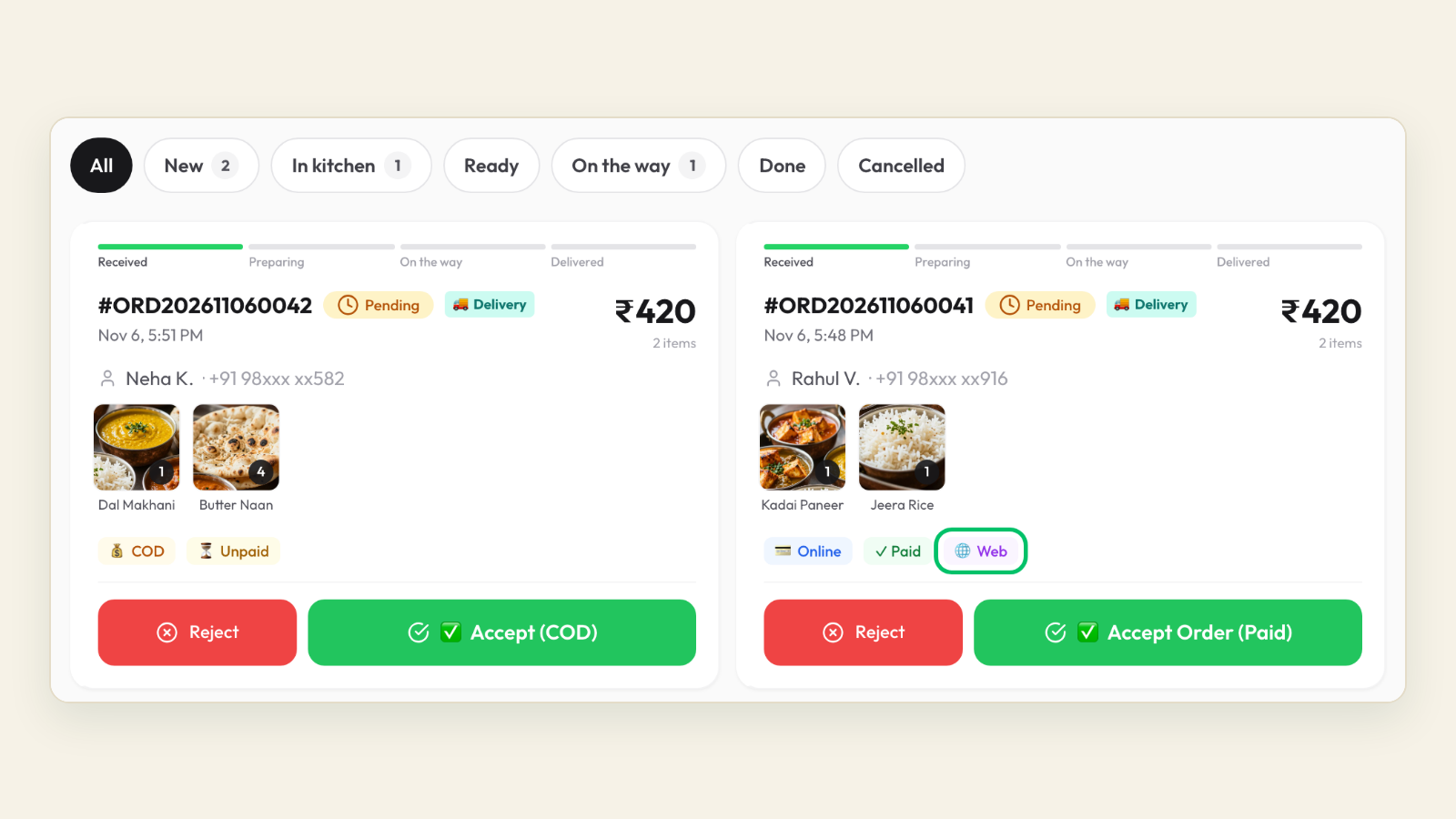
Orders from both channels land in one live dashboard and on the staff app, which sounds an alert for new orders so nobody misses one on a busy evening. Delivery zones with distance-based charges and a free-delivery threshold per zone replace the app's delivery logic. Coupons can auto-apply, so your "order direct and save" offer needs no code typing.
Pricing is flat: plans start at ₹999 a month, every order costs ₹10, and there is no commission. Every plan starts with a 7-day free trial, which is enough time to run the seven-day plan above with the channel already live. The 15-minute setup guide walks through the first login.
Open your direct channel before the listing goes
Set up WhatsApp ordering and a store page this week, then delist with your regulars already ordering from you.
Start your free 7-day trialFrequently asked questions
How long does it take to delist from a food delivery app?
It depends on the notice period in your partner agreement and how quickly support processes the request. Plan for anywhere from a few days to a few weeks between your written request and the listing coming down, and keep the outlet marked closed in the meantime so no orders arrive during the gap. Ask for a confirmed date in writing.
Can I rejoin a delivery app after delisting?
Usually yes, but treat it as a fresh onboarding. You will submit documents again, and your old ratings and reviews may not carry over. If there is any chance you want to come back, consider marking the outlet temporarily closed instead of a full delisting until you are sure.
Will I lose my delivery app reviews and rating?
Once the listing is removed, customers can no longer see it, so the reviews stop being visible. This is one reason to start collecting reviews on channels you control, such as your Google Business Profile and your own store page, well before you leave.
Is the process the same on every delivery app?
Broadly yes. Raise a written request through the app's partner support or your account manager, check the agreement for notice terms, settle pending payouts and ad balances, and get written confirmation. Export your statements first, because dashboard access ends with the account.
Do I have to pay anything to close a delivery app partner account?
There is normally no exit fee, but any outstanding dues, negative balances from refunds or unused ad spend are settled against your final payout. Read the final settlement statement line by line and raise a ticket for anything you do not recognise before the account is closed.